
N8N, Zapier & Make.com vs. Custom Integrations: The Modern Automation Showdown
(And Why You Need to Think Before You Drag-and-Drop)
Let's talk about the elephant in the server room.
For years, connecting your business systems meant one thing: calling a developer, opening your wallet, and waiting weeks (sometimes months) for a custom integration that would pipe data from System A to System B. It worked. It was reliable. It was also expensive, slow, and about as agile as a freight train on a roundabout.
Then tools like n8n, Make.com, and Zapier showed up, and suddenly your operations manager could wire together a CRM, an accounting package, and an AI model over lunch. No code. No tickets. No six-week sprint cycle.
But here’s the thing — just because you can build a workflow in 20 minutes doesn’t mean you should build all your workflows that way. Let’s break down what’s actually going on, where these tools shine, where they stumble, and when you should still pick up the phone and call in the experts.



What Are n8n, Zapier and Make.com, Exactly?
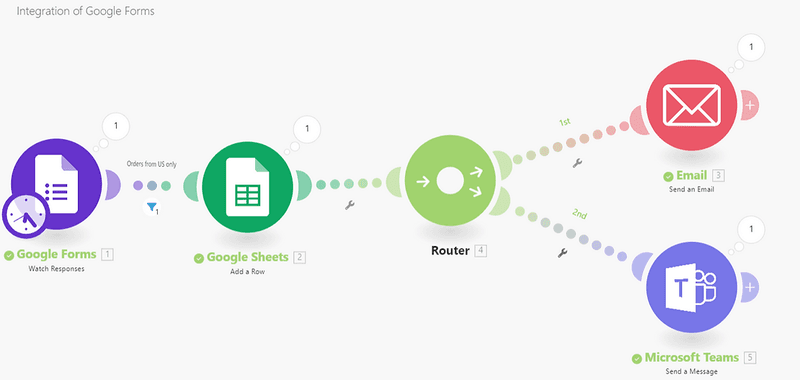
If you haven’t encountered them yet, n8n, Make.com (formerly Integromat), and Zapier are visual workflow automation platforms. Think of them as Lego sets for business processes. You drag nodes onto a canvas, connect them with lines, and data flows from one app to another.
n8n is open-source and self-hostable, which makes it popular with teams that care about data sovereignty (or just like running things on their own infrastructure). Make.com is fully cloud-hosted with a polished interface that’s arguably more beginner-friendly. Zapier is the most established player in the space, with the largest library of pre-built connectors and a reputation for being the easiest to get started with. All three offer hundreds of pre-built connectors to popular apps — from Slack and Gmail to Salesforce, HubSpot, and even Exact.
The key idea is the same: you build pipelines visually, without writing code, and they run automatically in the background.
Enter AI: The Upgrade Nobody Expected
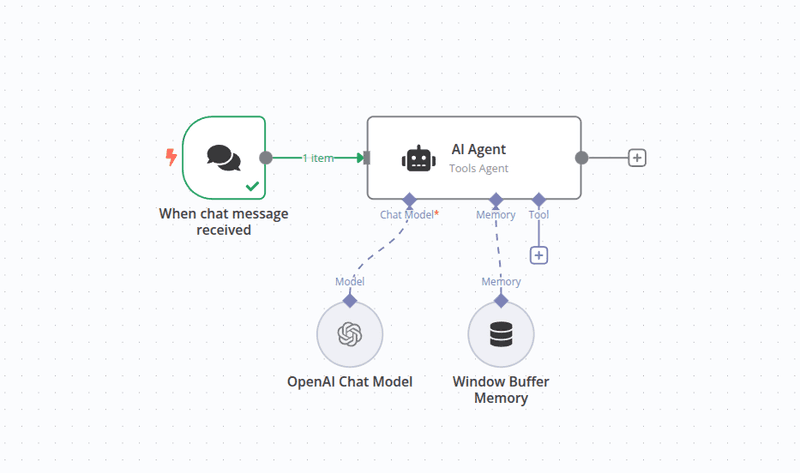
Here's where things get interesting. These platforms now let you drop AI models — large language models, image recognition — right into your workflows like any other node.
That's a big deal. A year or two ago, getting AI into your business processes meant hiring a machine learning engineer, setting up API integrations, handling authentication, managing rate limits, and probably debugging some Python at 2 AM. Now? You can add a node that says "send this text to GPT, get a summary back, pass it to the next step." Done.
Real-world example: imagine incoming customer emails automatically categorised by intent and urgency using AI, then routed to the right team, with a summary already attached. Two years ago, that's a development project. Today, that's an afternoon in Make.com.
A Real-World Case: Quotes Flowing Into Exact, Automatically
Here’s a scenario we’ve seen in practice. A sales team generates quotes — maybe in a CRM, maybe in a custom tool, maybe in a spreadsheet. Those quotes need to end up in Exact, the ERP and accounting platform that’s widely used in the Netherlands and beyond.
The old way? A developer builds a custom middleware service. It polls the CRM, transforms the data, handles authentication with the Exact API, maps fields, deals with error handling, and gets deployed somewhere it won’t fall over. Timeline: weeks. Cost: significant.
The new way? Someone builds a workflow in n8n, Make.com, or Zapier. A trigger fires when a new quote is created. The data gets mapped and transformed visually. It hits the Exact API through a pre-built connector. Error handling is configured with a few clicks. Timeline: hours, maybe a day. Cost: a platform subscription.
That’s a staggering difference in speed and cost — and for many businesses, it’s more than enough.
The Benefits: Why Everyone's Excited
There’s a reason these platforms are gaining traction so fast, and it’s not just hype. The benefits are real.
Speed of deployment is the obvious one. What used to take weeks now takes hours. When your business needs change quickly (and they always do), being able to spin up a new integration in an afternoon is transformative.
Accessibility matters too. You don’t need a computer science degree to build a workflow. Operations managers, marketing leads, finance teams — people who understand the business process best, can now directly assist in building automations themselves, if they have the time and inclination, that is.
Visual debugging is underrated. When something breaks in a custom integration, you’re reading logs and stack traces. When something breaks in n8n, Make.com, or Zapier, you can literally see which node failed and what data it received. It’s the difference between reading a map and being blindfolded in a maze.
AI integration is easy in principle. Adding intelligence to your workflows is no longer a separate engineering project.
And cost — at least initially — is significantly lower. Most platforms offer generous free tiers, and even paid plans are a fraction of what custom development costs.
The Pitfalls: Where It Gets Messy
Now for the part nobody puts in their marketing materials.
Spaghetti workflows are real. When anyone in the organisation can build automations, they will. Enthusiastically. Without documentation. Before you know it, you have 47 workflows built by 12 different people, some of which depend on each other in ways nobody fully understands. One person leaves the company, and suddenly nobody knows why the invoicing process stopped working on Tuesdays.
Error handling is surface-level. Yes, you can add error paths in these tools. But the error handling you get is nothing like what a seasoned developer builds into production code. Retry logic, circuit breakers, dead letter queues, graceful degradation — these concepts exist in the visual builder world, but they’re limited compared to what code can do.
Security and compliance are genuine concerns. When your data flows through a third-party platform, you need to ask hard questions. Where is the data processed? Who has access? Is it encrypted in transit and at rest? For industries with strict regulatory requirements, running sensitive data through a SaaS automation tool might not fly with your compliance team.
Performance has limits. These tools work beautifully for moderate volumes — a few hundred or even a few thousand events per day. But if you’re processing millions of records, doing heavy data transformations, or need sub-second latency, you’ll hit the ceiling fast.
Vendor lock-in is sneaky. Your workflows live on the platform. Your logic is encoded in their proprietary format. If the platform changes pricing, gets acquired, or shuts down, migrating 50 workflows to a new platform is a project in itself. n8n’s self-hosting option mitigates this somewhat, but it’s still a factor.
Missing integrations can stop you cold. These platforms boast impressive connector libraries, but they don’t cover everything. If your business relies on a niche ERP system, a legacy API, or a proprietary internal tool, there may simply be no pre-built connector available. You’ll find yourself staring at a blank canvas with nowhere to plug in.
So What Happens When The Connector You Need Doesn’t Exist?
A client picks n8n, Make.com, or Zapier, starts building their automation, and then discovers that a critical system in their stack doesn’t have a pre-built integration.
In these cases, the visual builder isn’t broken — it’s just incomplete. And this is exactly where a development partner (like us at Aery!) adds value. Our engineers can build custom connectors, write the API integration layer, and plug it into your existing automation platform so the rest of your no-code workflows keep running seamlessly. You get the best of both worlds: the speed of a visual builder for the straightforward parts, and proper engineering for the parts that need it.
When Old-School Integrations Still Win
Custom integrations aren't dead. Not by a long shot. There are scenarios where they're not just preferable — they're essential.
High-volume data processing is the clearest case. If you're syncing millions of database records nightly, or processing real-time event streams, you need purpose-built code running on infrastructure you control.
Complex business logic doesn't always fit in a visual canvas. When your data transformation involves 15 conditional branches, recursive lookups, and custom algorithms, a drag-and-drop interface becomes more hindrance than help. Sometimes, code is simply the clearest way to express complicated logic.
Mission-critical systems demand a level of reliability and observability that visual builders can't always provide. If your payment processing pipeline goes down, you need monitoring, alerting, automated failover, and the ability to debug at a level that goes deeper than "this node turned red."
Compliance and data residency requirements may mandate that data never leaves your infrastructure. Self-hosted n8n can help here, but Make.com and similar cloud platforms are off the table for certain use cases.
The Smart Approach: It's Not Either/Or
Here's what we've seen work best in practice: treat it as a spectrum, not a binary choice.
Use n8n or Make.com for the quick wins — the departmental automations, the internal workflows, the "let's connect these two SaaS tools and save someone three hours a week" projects. These tools are perfect for prototyping, for proving that an automation is worth building, and for processes where speed of delivery matters more than industrial-grade resilience.
But when the stakes are high, the volumes are large, or the logic is complex, bring in the engineers. Build it properly. Write tests. Set up monitoring. Document it. And importantly — understand that the custom integration you build today might start as a prototype in n8n tomorrow and graduate to code when it outgrows the visual builder.
The worst thing you can do is assume one approach fits everything. The next worst thing is building a critical business process on a no-code platform and only discovering its limitations when it breaks at scale on a Friday evening.
The Bottom Line
Modern automation platforms like n8n, Make.com, and Zapier have dramatically lowered the barrier to connecting business systems. With AI now baked into these workflows, the possibilities are broader than ever. That’s genuinely exciting, and businesses that ignore these tools are leaving speed and efficiency on the table.
But they’re not a silver bullet. They’re a powerful tool in a broader toolkit — one that works best when you know its limits, have the expertise to fill in the gaps when integrations are missing, and can fall back on something more robust when the situation demands it.
The real competitive advantage isn’t choosing one approach over the other. It’s knowing which one to reach for, when — and having a partner like Aery who can help you across the entire spectrum.
You may be interested in these articles
Leave a message
Contact us if you have any questions about our company or products. We will try to provide an answer within a few days.